
Data Classification: The Step Every Enterprise AI Rollout Skips, and What It Costs Later
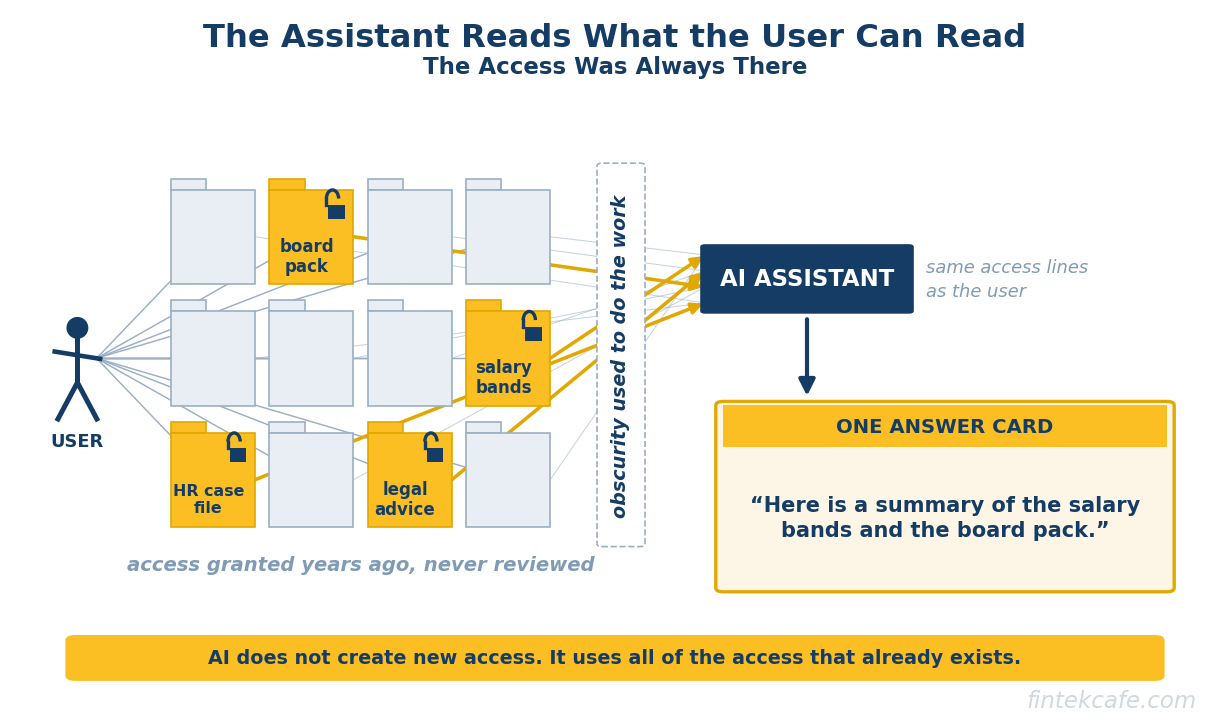
Data classification is the practice of labelling information by how sensitive it is and what kind of information it is, so that systems can treat it differently. It is the step most enterprise AI rollouts skip, and it is the reason so many of them stall: an AI assistant can read everything its user can read, and almost no organization knows what its users can read. In a Gartner survey of 132 IT leaders conducted in June 2024 and reported by Computerworld, 40 percent said data oversharing concerns had delayed their Microsoft 365 Copilot rollout by three months or more, and 57 percent had limited the rollout to low-risk or trusted users. The tool was not the problem. The tool simply made an old problem visible at machine speed. The position of this article is direct: classification is not a compliance chore to run in parallel with AI adoption, it is the control plane that AI adoption depends on, and an organization that deploys assistants and agents before it can say what is restricted is accepting a risk it cannot measure.
Key Takeaways
- Enterprise AI assistants inherit the user's permissions. That is the right design, and it means every historical oversharing mistake in file shares, mailboxes and SaaS tools becomes searchable, summarisable and actionable the day the assistant switches on.
- Classification is the prerequisite for nearly every AI data control that matters: retrieval filters, data loss prevention on prompts and outputs, label inheritance on generated content, and blocking agents from acting on restricted records. Label-based controls do nothing for content that carries no label.
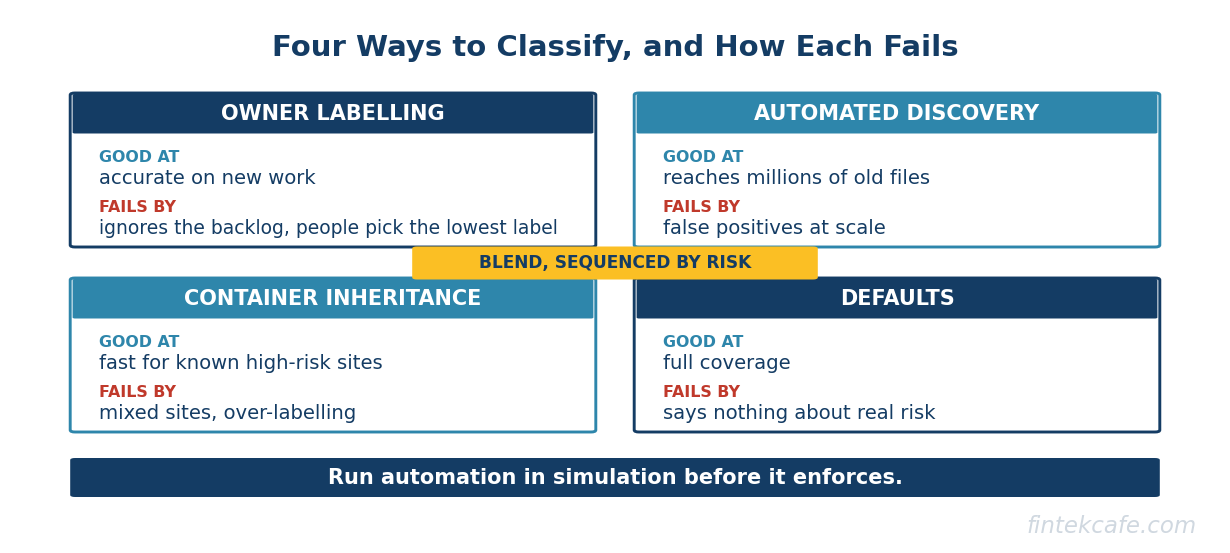
- There are four ways to classify (owner labelling, automated discovery and labelling, inheritance from containers, and defaults), and each fails differently. The workable answer is a blend, sequenced by risk, with automation run in simulation before it is allowed to enforce.
- Do not try to classify everything. Classify the small set of data that would cause real harm if an assistant surfaced it to the wrong person, contain the highest-risk locations while that happens, and expand from there.
- The hardest part is organizational, not technical: every label needs an owner, a review cadence and a consequence. Without those, a classification scheme decays into a set of names nobody applies.
Why AI Turned an Old Gap Into an Urgent One
The assistant can read what the user can read
Microsoft's own architecture documentation for Copilot states the design plainly: Copilot "can only summarize or reference content that the user is authorized to access." Google applies the same principle to Gemini in Workspace. This is the correct security model. An assistant that ignored permissions would be indefensible.
The problem is what "authorized to access" means in a typical enterprise. Over years, sites were shared with "everyone except external users" for convenience, folders were opened to an entire department for one project and never closed, sharing links were set to anyone in the organization, and staff changed roles without losing old access. None of this mattered much while finding a file required knowing it existed and where it lived. Obscurity did the work that permissions were supposed to do.
An AI assistant removes obscurity. A question such as "what are the salary bands for senior engineers" returns whatever the user can technically open, in seconds. The access was always there. The assistant is simply the first tool that uses all of it.
The scale is not hypothetical
Independent data risk research shows how much overexposed data sits in a typical estate. Varonis's 2025 State of Data Security Report, based on data risk assessments of 1,000 organizations and published in May 2025, found that 99 percent had sensitive data unnecessarily exposed to AI tools, and that 90 percent of sensitive cloud data was open and accessible to AI tools. Concentric AI's 2025 Data Risk Report, covered by Help Net Security in September 2025, found that Copilot accessed nearly three million sensitive data records per organization in the first half of 2025, and that organizations held an average of seven million stale records and ten million duplicate records. Both come from security vendors analysing their own customers, so treat them as direction rather than an industry average. The direction is consistent.
The breach data points the same way. IBM's Cost of a Data Breach Report 2025, released in July 2025, found that 13 percent of organizations reported breaches of AI models or applications, and that 97 percent of those lacked proper AI access controls. One in five organizations reported a breach involving shadow AI, and organizations with high levels of shadow AI saw breach costs about 670,000 US dollars higher on average. The governance side of that problem is covered in how unsanctioned AI tools spread and which governance works.
Agents raise the stakes again
An assistant that surfaces a restricted document to the wrong employee is a disclosure. An agent that reads the same document and then emails it to a supplier is a disclosure with a delivery mechanism. With agents, "what can this read" becomes "what can this move," and the answer still depends on knowing which data is restricted.
What Data Classification Actually Is
Two dimensions: sensitivity and type
A working scheme labels data on two axes.
Sensitivity describes the harm if the data reached the wrong audience. Most schemes use four or five levels. Microsoft's recommended default taxonomy in Purview, for organizations without an existing scheme, is Personal, Public, General, Confidential and Highly Confidential, with sublabels under the upper levels that set who can open the content.
Type describes what the data is: personal data, payment card data, health information, trade secrets, legal privilege, source code, material non-public information. Type matters because regulatory obligations attach to types, not to levels. A file can be Confidential because it contains a merger plan or because it contains employee health records, and those two files need different handling even at the same level.
Labels need owners
The owner of a label is the business function that understands the harm, not IT. Human Resources owns restricted employee data, Legal owns privilege, Finance owns pre-release results. IT and security own the tooling that applies and enforces labels.
A classification scheme built for AI
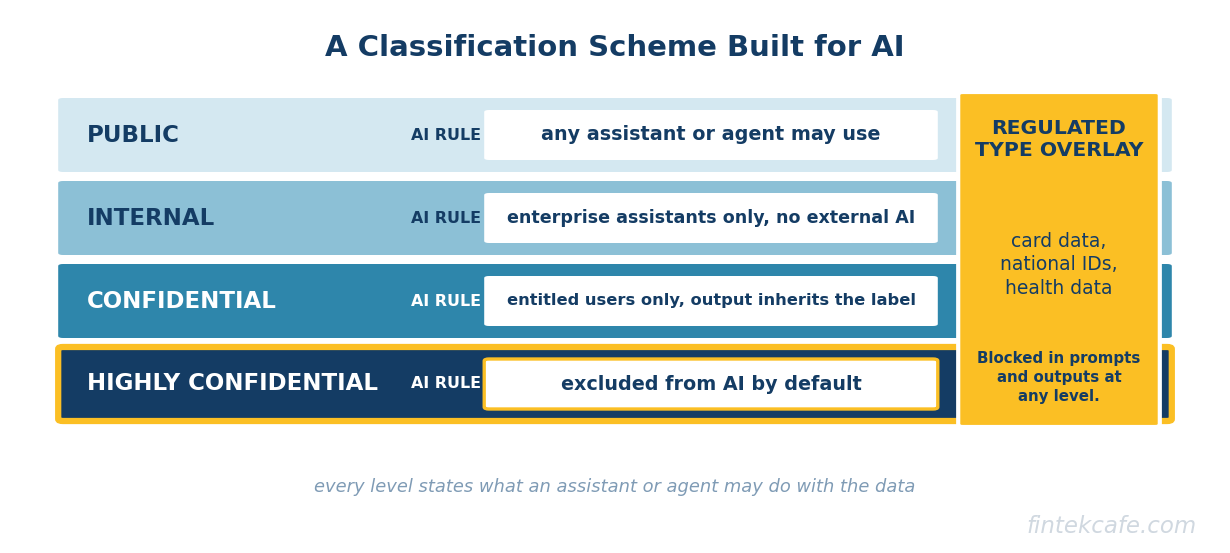
The table below is a practical starting scheme. The final column is what makes it an AI scheme rather than a records-management scheme: every level states what an assistant or agent may do with the data.
| Level | Typical examples | AI handling rule |
|---|---|---|
| Public | Published marketing, press releases, public filings, product documentation | Any assistant or agent may read, summarise and use as grounding. No restrictions on output. |
| Internal (General) | Policies, project plans, internal wikis, routine operational reports | Enterprise assistants may read and summarise for employees. Not sent to external AI services or used in external web search prompts. |
| Confidential | Customer contracts, pricing models, unannounced product plans, non-sensitive personal data | Readable by assistants only for users already entitled. Generated content inherits the label. Agents may not send it outside the organization without approval. |
| Highly Confidential / Restricted | Board and M&A material, compensation, health and HR case files, credentials, legal privilege, pre-release financials | Excluded from assistant grounding by default. Agents may not read or act on it. Access by explicit exception, logged and reviewed. |
| Regulated type (overlay) | Payment card data, national identifiers, health data, special category personal data | Detected and blocked in prompts and outputs regardless of level. Residency and retention rules apply to any AI copy. |
The top tier is excluded from AI by default because the value of an assistant summarising compensation files is small and the cost of one wrong answer is large. Regulated types sit as an overlay because a national identifier in an Internal spreadsheet still needs to be caught.
The Four Ways to Classify, and How Each Fails
Owner labelling
The author applies the label, usually prompted by the application. This is the most accurate method for new content. It fails in two ways: people pick the lowest label that lets them get on with their work, and nobody goes back to label the files created before the scheme existed.
Automated discovery and labelling
A scanning service inspects content for patterns (card numbers, national identifiers), trained classifiers (contracts, résumés, source code) or, increasingly, instructions given to a language model, and applies labels automatically. Google made Gemini-based data classification in Google Drive available in open beta on August 28, 2026, letting administrators describe a label in plain language instead of training a model. Microsoft Purview offers service-side auto-labelling with sensitive information types and trainable classifiers.
Automation is the only practical way to reach the backlog. Its failure mode is false positives at scale: a rule that encrypts anything resembling a card number locks teams out of harmless spreadsheets, and the business demands it be switched off. Microsoft's guidance is to run auto-labelling policies in simulation first, review what would have been labelled, and tune before enforcing. That advice generalises to every vendor: automation should observe before it acts, in the same way an agent should.
Inheritance from containers
Labels are applied to a site, team or folder, and content inherits them: a board site is Highly Confidential, so everything in it is. Inheritance is fast. It fails when containers are mixed, and it encourages over-labelling, which hides useful content from the assistant and pushes users toward unsanctioned tools.
Defaults
Every new item gets a baseline label unless someone changes it. Microsoft's default label policy sets General as the default and requires a justification to remove or lower a label. Defaults ensure coverage. They fail by being uninformative: if everything is Internal, the label says nothing about where the real risk sits.
The position, and its tradeoff
The recommended blend is: defaults for coverage, container inheritance for the known high-risk locations, automated discovery for regulated types and the backlog, and owner labelling for new sensitive work. The tradeoff is explicit. A blended approach accepts some mislabelling in exchange for coverage within months rather than years, and it requires a standing process to tune automated rules and handle disputes. Organizations that insist on accurate manual labelling of everything before allowing AI will still be labelling when their competitors have shipped, and their employees will have found other tools in the meantime.
What to Classify First
Trying to label every file in the estate before an AI rollout is the most common reason classification programs never finish. The better approach ranks data by the harm an assistant could cause by surfacing it to the wrong internal user, and starts at the top.
The first tier is almost always the same across industries: compensation and HR case files, board and transaction material, legal privilege, credentials stored in documents, health data, and pre-release financial results. It is small in volume, concentrated in few locations, and catastrophic if surfaced to the wrong person. The second tier is customer and partner data under contract; the third is intellectual property. Everything else can wait for defaults and gradual owner labelling.
While the first tier is being labelled, contain it. Microsoft's Restricted Content Discovery, part of SharePoint Advanced Management for Copilot-licensed tenants, removes selected sites from organization-wide search and Copilot discovery without changing anyone's permissions. Microsoft's documentation describes it as a temporary governance control, and notes that for sites with more than 500,000 items an update can take more than a week to take effect. Containment buys time. It does not fix the underlying permissions, and it should not become permanent.
How Labels Connect to AI Controls
Classification only pays off when labels drive enforcement. Four connections matter.
Retrieval filters and grounding
The assistant or retrieval pipeline should check labels before content is used to ground an answer. In Microsoft 365, a Purview data loss prevention policy targeting the Copilot location can exclude files and emails with chosen sensitivity labels from processing: Microsoft's documentation, updated in October 2026, states that such items may still appear in citations but their content is not used in the response. Google's DLP for Gemini, generally available for Enterprise Standard and Plus and several other editions, can block Gemini from accessing Drive files with specified label values; Google notes it currently covers Drive data only. For custom retrieval-augmented systems built in-house, the same rule has to be implemented in the retrieval layer, which means labels must be carried into the index alongside the content.
DLP on prompts and outputs
Sensitive information typed into a prompt is a separate leak path. Microsoft's Copilot DLP can block responses to prompts containing specified sensitive information types (a feature Microsoft lists as in preview as of October 2026) and can stop such prompts being used for external web search. The same documentation notes a gap worth knowing: DLP cannot scan files uploaded directly into a prompt, only the text typed.
Label inheritance on generated content
When an assistant writes a summary of a Confidential document, the summary is also Confidential. Microsoft states that when Copilot generates content from labelled sources, the highest-priority label is inherited where supported. Without inheritance, AI becomes a laundering machine: restricted content goes in, an unlabelled summary comes out and is shared freely.
Blocking agent actions on restricted data
Agents need a rule that is stricter than the one for assistants: no reading, and no acting, on the top tier without an explicit exception. Microsoft's documentation notes that Copilot agents cannot read files protected with user-defined label permissions, which is one mechanism; for custom agents the check belongs in the tool layer, so that a tool call involving restricted data is refused regardless of what the model asked for. This is a direct application of the principle in zero trust architecture: verify each request against the sensitivity of what it touches, rather than trusting the agent because it is inside the perimeter.
The same labels answer other AI questions: which data may leave a region, covered in where prompts and embeddings actually live, and which datasets may feed models, which belongs in the data contracts between producers and consumers.
The Organizational Problem
Who owns a label
Every label needs a named business owner who decides what belongs in it and approves exceptions. Without one, disputes go to IT, which lacks the authority to settle them, and the scheme stalls.
How often labels are reviewed
Sensitivity changes: a product plan is Highly Confidential until launch and Public afterwards. A review cadence, at least annual for the top tier and triggered by events such as a deal closing, keeps labels meaningful. Permissions need the same cadence; SharePoint Advanced Management includes site access reviews for this, and any system an assistant can search needs an equivalent.
What happens when someone mislabels
A scheme needs a consequence that is proportionate and predictable. For most organizations that means a correction workflow and coaching, with escalation reserved for deliberate downgrading of restricted material. Treating every mislabel as misconduct makes people avoid labelling altogether. Classification policy belongs in the broader AI governance policy, so that employees see one set of rules rather than three.
A Decision Framework: The First 90 Days
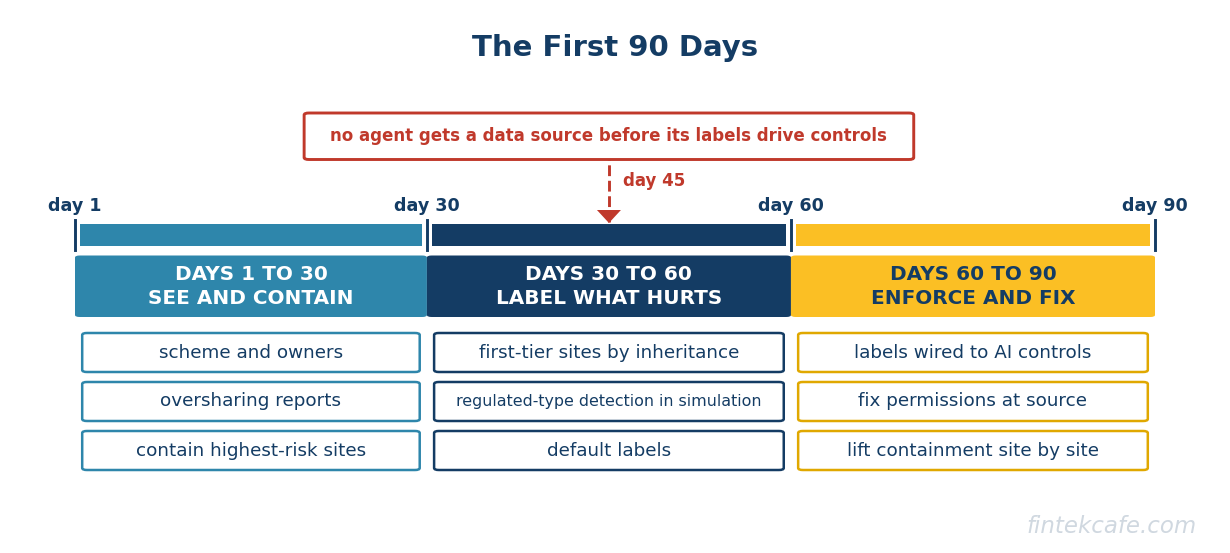
The sequencing table below assumes an organization that has bought or is about to deploy an enterprise assistant and has little or no working classification. Effort and risk reduction are relative judgements for planning, not measured values.
| Step | Days | Effort | Risk reduced |
|---|---|---|---|
| 1. Agree a four- or five-level scheme with an AI handling rule per level, and name business owners | 1 to 15 | Low | Low on its own; enables everything else |
| 2. Run oversharing reports on the estate the assistant will search: broadly shared sites, organization-wide links, stale access | 1 to 30 | Low to medium | Medium: identifies the worst exposure fast |
| 3. Contain the highest-risk locations from AI discovery while they are reviewed | 15 to 30 | Low | High for the contained locations |
| 4. Label first-tier locations by container inheritance (board, HR, legal, finance close) | 15 to 45 | Medium | High |
| 5. Deploy automated detection for regulated types in simulation, tune, then enforce | 30 to 75 | Medium to high | High for regulated data |
| 6. Set default labels for new content and require justification to downgrade | 30 to 45 | Low | Medium over time |
| 7. Wire labels to AI controls: grounding exclusion for the top tier, prompt DLP for regulated types, label inheritance on outputs | 45 to 75 | Medium | High |
| 8. Fix permissions at the source on contained sites and lift containment site by site | 60 to 90 and ongoing | High | High and durable |
How to read the framework by situation
Assistant already live, little classification. Do steps 2 and 3 in the first two weeks, before anything else. Containment is the only fast lever, and the exposure exists today.
Rollout planned, regulated industry. Prioritise step 5. Regulators and auditors will ask how regulated data types are kept out of prompts, outputs and external AI services, and an answer that depends on users choosing the right label will not satisfy them.
Agents planned, not just assistants. Do not grant an agent access to any data source until step 7 is in place for that source. An agent with unscoped read access and the ability to send email is the highest-risk configuration in enterprise AI today.
Mature classification already exists. The work is mainly step 7. Many organizations labelled data for records retention years ago and never connected those labels to AI controls, so the labels exist and protect nothing.
Classification should not become a reason to delay AI indefinitely. A pilot with a trusted group, on a contained estate, with the top tier excluded, is a reasonable way to learn. The mistake is broad deployment before steps 2 through 4, not adoption itself.
Frequently Asked Questions
What is data classification for AI?
Data classification for AI is labelling information by sensitivity and type, and attaching a rule to each label that states what AI assistants and agents may do with it. The labels then drive enforcement: which content can ground an answer, what is blocked in prompts and outputs, and what an agent may read or act on.
Why does Microsoft 365 Copilot overshare data?
Copilot does not grant new access. It returns content the user is already permitted to open, and many organizations have years of overly broad sharing in SharePoint, OneDrive and Teams. The fix is permission clean-up and classification, with temporary containment of high-risk sites while that work happens.
Do you need to classify all data before deploying AI?
No. Classify and contain the small set of data that would cause serious harm if surfaced to the wrong person, such as compensation, board material, legal privilege and health data, then deploy to a limited group while the rest of the program continues. Waiting for complete classification usually means never deploying and pushing employees toward unsanctioned tools.
Is automated data classification accurate enough to rely on?
For well-defined regulated types such as card numbers and national identifiers, pattern-based detection is reliable enough to enforce after tuning. For judgement-based categories such as strategic plans, automated classifiers produce false positives and misses, so run them in simulation, review samples, and combine them with container labels and owner labelling rather than relying on them alone.
Who should own data classification?
Business functions should own the definitions for their data: HR for employee data, Legal for privilege, Finance for financial results. IT and security own the tooling and enforcement, and a central governance group sets the scheme and settles disputes.
The Bottom Line
Every enterprise AI program discovers that its assistants and agents are only as safe as the permissions and labels underneath them. Organizations that discover it before deployment spend a few months on containment, labelling and wiring labels to controls. Those that discover it afterwards spend the same months on incident response and a paused rollout.
Treat classification as the control plane for AI rather than a records-management project, start with the data that would hurt most, and accept imperfect coverage in exchange for speed. The alternative is deploying systems that can read everything into an organization that does not know what everything contains.
Related Articles
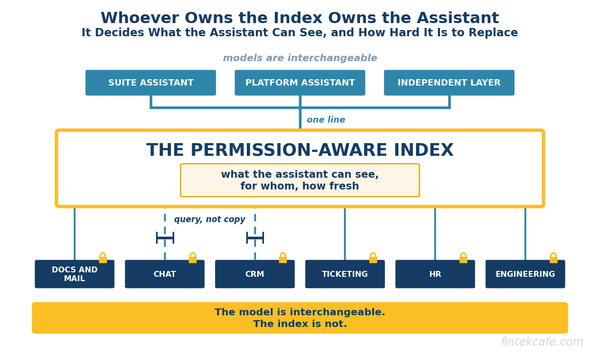
Enterprise Search Is Back, and This Time It Decides Which AI Assistant Wins
Enterprise search failed for twenty years. Now the permission-aware index behind every AI assistant is the control point, and its owner wins.
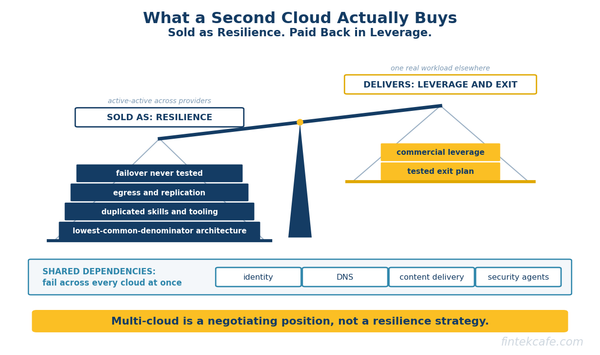
Multi-Cloud Is a Negotiating Position, Not a Resilience Strategy
Running one workload across two clouds rarely pays for itself. A second cloud's real value is leverage and exit evidence. Which workloads need what.
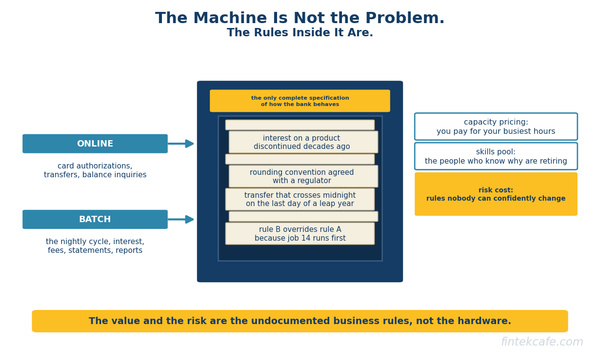
Why Banks Still Run Mainframes, and What Replacing One Actually Costs
Why banks still run mainframes, the real cost of COBOL estates, and which modernization paths work: rehost, refactor, strangler or full core replacement.