
What Is a Payment Gateway? How Online Payments Actually Work
Every time you tap "Buy Now" on a website, a chain of events unfolds in about 1.5 seconds. Your card details fly through at least six different systems, get encrypted, verified, approved (or declined), and logged. The money doesn't actually move until days later. And the piece of technology that kicks off the whole process is something most people have never heard of: the payment gateway.
If you're a product manager building checkout flows, an executive evaluating payment vendors, or anyone who needs to understand how online commerce actually works under the hood, this is the guide you need.
The Simple Version
A payment gateway is software that sits between a merchant's website and the financial system. When a customer enters their card details at checkout, the payment gateway securely collects that information and routes it through the payment network for approval.
Think of it like a digital point-of-sale terminal. In a physical store, you swipe or tap your card on a terminal. That terminal talks to the bank and gets an approval code. Online, there's no physical terminal. The payment gateway plays that role. It's the secure front door between the internet and the banking system.
But that's the simplified version. The reality is more nuanced, and understanding the full picture matters if you're making decisions about payment infrastructure.
The Full Payment Flow: What Happens in 1.5 Seconds
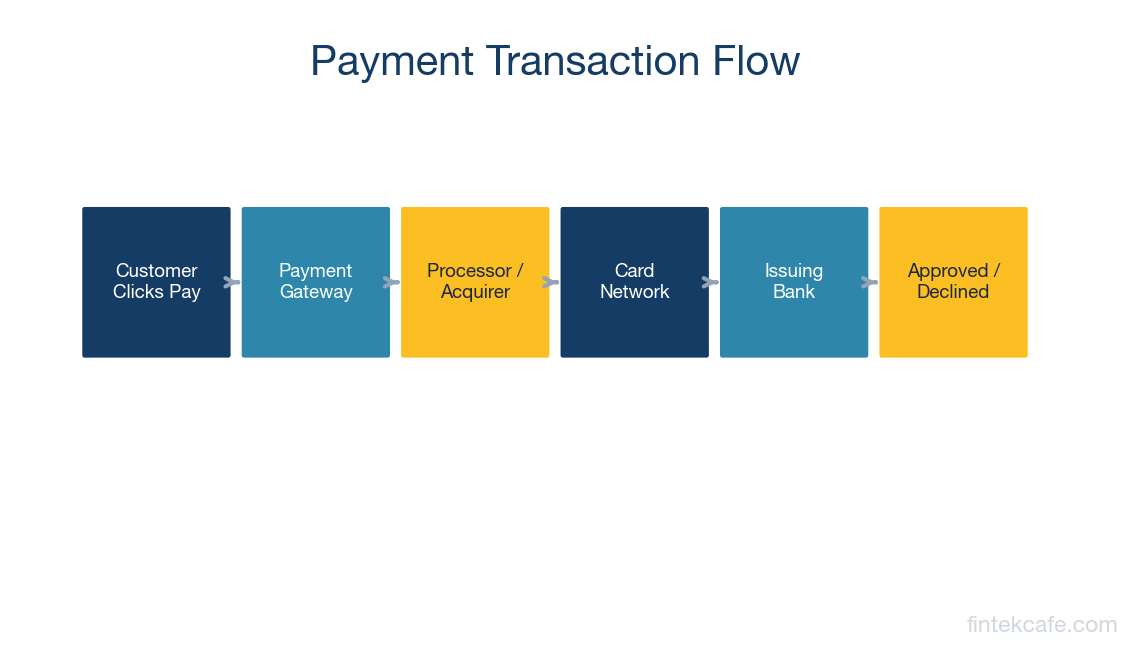
When a customer clicks "Pay" on an e-commerce site, here's what actually happens. Every step takes milliseconds.
Step 1: The Customer Submits Payment Details
The customer enters their card number, expiration date, CVV, and billing address on the merchant's checkout page. Critically, if the merchant is using a modern payment gateway, the card details never touch the merchant's own servers. The gateway provides an embedded form or JavaScript library that captures the card data directly, encrypting it before it ever leaves the customer's browser.
This is important for a regulatory reason called PCI DSS (Payment Card Industry Data Security Standard). Any company that handles raw card numbers must comply with extensive security requirements. By using a gateway that captures card data directly, merchants can dramatically reduce their PCI compliance burden.
Step 2: The Payment Gateway Encrypts and Forwards
The gateway receives the encrypted card data, performs initial validation checks (Is this a valid card number format? Is the card expired? Does the billing address match?), and packages everything into a standardized authorization request. This request includes the card number, transaction amount, currency, merchant ID, and various risk signals.
The gateway then routes this request to the appropriate payment processor.
Step 3: The Payment Processor Routes to the Card Network
The payment processor receives the authorization request and forwards it to the correct card network: Visa, Mastercard, American Express, or Discover. The processor adds its own data (merchant category code, terminal type, transaction identifiers) and sends a formatted message using a protocol called ISO 8583, the standard language that the global payment system speaks.
Step 4: The Card Network Routes to the Issuing Bank
The card network (say, Visa) receives the request and routes it to the issuing bank, the bank that issued the customer's card. Visa doesn't approve or decline the transaction itself. It's a messenger. The issuing bank makes the decision.
Step 5: The Issuing Bank Decides
The issuing bank checks several things in milliseconds: Does the customer have enough funds or credit? Is the card reported stolen? Does this transaction match the customer's spending patterns (fraud detection)? Is the card blocked for international transactions?
Based on these checks, the bank returns an approval code or a decline reason.
Step 6: The Response Travels Back
The approval or decline travels the same path in reverse: issuing bank to card network to processor to gateway to merchant's website. The customer sees "Payment Successful" or "Payment Declined."
This entire round trip, six systems, multiple network hops, fraud checks, and balance verification, typically completes in under two seconds.
Step 7: Settlement (Hours to Days Later)
Here's the part most people don't realize: when a payment is "approved," no money has actually moved. The issuing bank has placed a hold on the customer's funds, but the actual transfer happens later through a process called settlement.
At the end of each business day, the merchant's payment processor sends a batch of all approved transactions to the card networks. The networks coordinate the movement of funds from issuing banks to acquiring banks (the merchant's bank). This typically takes 1-2 business days, sometimes longer for international transactions.
This is why you sometimes see a "pending" charge on your credit card statement that later changes to a final amount. The pending charge is the authorization hold. The final charge is the settlement.
Authorization vs. Capture vs. Settlement: Why It Matters
These three stages trip up a lot of people, but they matter for business operations.
Authorization is the real-time approval. The issuing bank says "yes, this card is good for $50." A hold is placed on the customer's funds.
Capture is when the merchant tells the processor "I'm ready to collect that $50." For most e-commerce transactions, authorization and capture happen simultaneously. But in some cases (hotels, car rentals, restaurants with tips), they're separated. A hotel might authorize $500 when you check in but capture $450 when you check out.
Settlement is the actual movement of money. The funds transfer from the issuing bank through the card network to the merchant's bank account. This is when the merchant actually gets paid.
Why does this matter? Because the gap between authorization and settlement affects cash flow. A merchant might show $100,000 in sales today but not have those funds in their bank account for 2-3 days. For businesses with thin margins or high volume, this delay is a real operational concern. Some modern processors like Stripe and Adyen offer accelerated settlement (next-day or even same-day) as a premium feature.
What a Payment Gateway Actually Does (Beyond the Basics)
The "routes card data to the bank" description is accurate but incomplete. Modern payment gateways do significantly more.
Tokenization
Once a customer enters their card details, the gateway replaces the actual card number with a random token (something like "tok_1Mj3Y2eZvKYlo2C"). This token is meaningless to anyone who intercepts it. The actual card number is stored securely in the gateway's vault. When the customer returns to buy again, the merchant uses the token, never touching the real card data. This is how "one-click checkout" works.
Fraud Detection
Modern gateways analyze dozens of signals in real time: the customer's IP address, device fingerprint, purchase history, velocity of transactions, and behavioral patterns. Stripe's Radar system, for example, uses machine learning trained on data from millions of merchants to score each transaction for fraud risk. A gateway that just routes payments without fraud screening is a liability.
Retry Logic and Smart Routing
Payments fail for many reasons. Sometimes the processor is down. Sometimes a specific issuing bank is having issues. Smart gateways automatically retry failed transactions through alternative routes. Some gateways maintain connections to multiple processors and route each transaction through whichever path has the highest approval rate for that card type and region. This is called intelligent routing, and it can improve approval rates by 2-5%, which for a large merchant translates to millions in recovered revenue.
Multi-Currency Support
For international merchants, the gateway handles currency conversion, presents prices in the customer's local currency, and manages the complexity of cross-border transactions (which have different interchange rates, compliance requirements, and processing rules).
3D Secure Authentication
3D Secure (branded as "Visa Secure" or "Mastercard Identity Check") is an additional authentication layer where the customer verifies their identity with their bank, usually through a one-time code or biometric. The gateway manages this redirect flow. In Europe, 3D Secure is effectively mandatory under PSD2's Strong Customer Authentication rules. In other markets, it's optional but shifts fraud liability from the merchant to the issuing bank, which is a significant financial incentive.
Recurring Billing
For subscription businesses, the gateway stores card tokens and automatically charges customers on a schedule. It handles the complexity of expired cards (some gateways work with card networks to automatically update stored card details when a customer gets a new card), failed payment retries, and dunning (the process of attempting to recover failed subscription payments).
Payment Gateway vs. Payment Processor: What's the Difference?
This is one of the most common points of confusion. Here's the clean distinction.
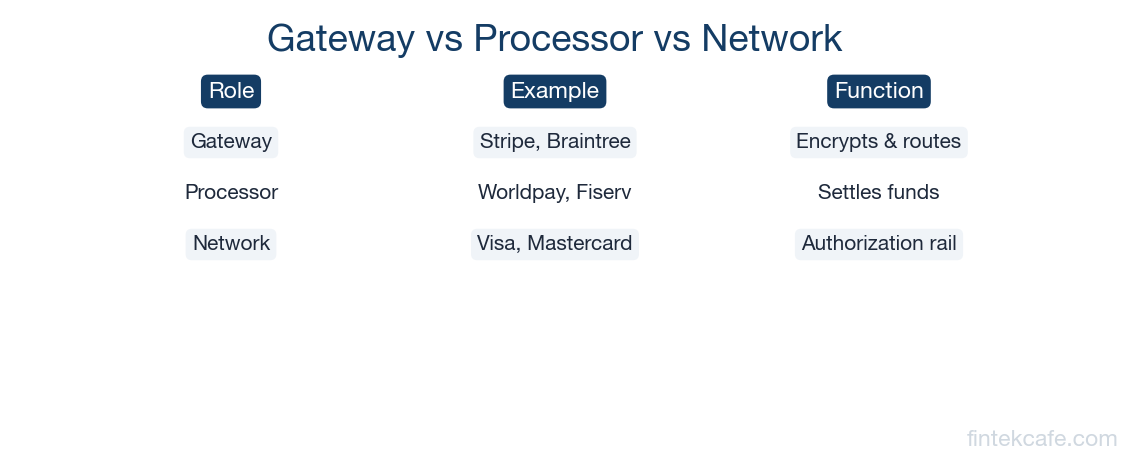
A payment gateway is the customer-facing layer. It collects card data, encrypts it, and passes it along. Think of it as the front door.
A payment processor is the back-end system that actually communicates with card networks and banks, handles settlement, and manages the flow of funds. Think of it as the engine room.
In practice, many modern companies combine both functions. Stripe is both a gateway and a processor. So is Adyen. When you use Stripe, you're using their gateway (Stripe.js, their checkout form) and their processing infrastructure (Stripe talks directly to Visa and Mastercard).
Older payment architectures often separated these roles. A merchant might use Authorize.net as their gateway and First Data (now Fiserv) as their processor. This still exists, but the trend is toward integrated platforms that handle everything.
Payment Service Providers (PSPs) like Stripe, Adyen, and Square take integration even further. They combine gateway + processor + merchant account into a single package. Instead of a merchant needing to open a merchant bank account, get a processor, and connect a gateway separately, a PSP bundles everything. Sign up, integrate, start accepting payments.
Stripe vs. Adyen vs. Braintree: How the Big Three Compare
If you're choosing a payment gateway for your business, these three are likely on your shortlist. They serve different segments and have different strengths.
Stripe
Best for: Startups, SaaS companies, platforms, and developer-led organizations.
Stripe's core advantage is developer experience. Their API documentation is widely considered the best in fintech. Integration is fast, the API design is clean, and the ecosystem of tools (Stripe Billing for subscriptions, Stripe Connect for marketplaces, Stripe Atlas for company formation) is extensive.
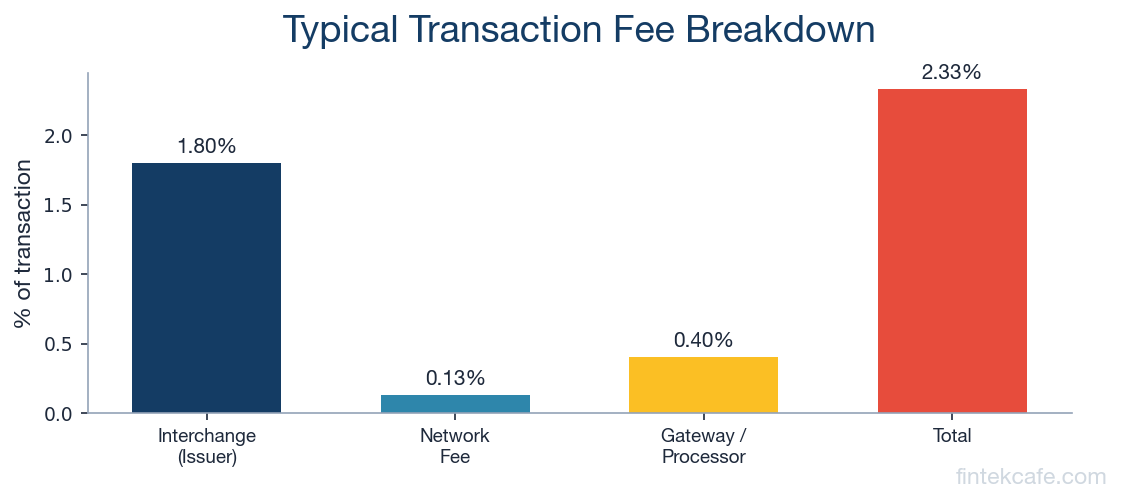
Pricing is straightforward: 2.9% + $0.30 per transaction for US card payments. International cards and currency conversion cost more. Volume discounts are available for large merchants.
Stripe processes hundreds of billions of dollars annually. Companies like Shopify, Amazon (for some flows), Instacart, and Slack use Stripe.
Limitation: Stripe historically focused on online payments. Their in-person (point-of-sale) offering, Stripe Terminal, exists but isn't as mature as competitors in the physical retail space.
Adyen
Best for: Large enterprises, omnichannel retailers, and global businesses.
Adyen was built for scale. It processes payments for McDonald's, Uber, Spotify, eBay, and Microsoft. Where Stripe started online and moved into physical retail, Adyen has offered unified online and in-store payments from the start.
Adyen's pricing model is interchange-plus, meaning the merchant pays the actual interchange fee (set by card networks) plus a fixed Adyen markup. For large-volume merchants, this is often cheaper than Stripe's flat-rate pricing. For smaller merchants, the math may not be as favorable, and Adyen's minimum monthly processing requirements effectively exclude small businesses.
Limitation: Adyen is not designed for startups or small merchants. Minimum volume requirements, enterprise-focused sales process, and less hand-holding for small integrations.
Braintree (PayPal)
Best for: Merchants who want PayPal integration, mobile-first businesses, and companies in the PayPal ecosystem.
Braintree is owned by PayPal and offers seamless integration with PayPal, Venmo, and Pay Later products. If a significant percentage of your customers prefer PayPal (common in e-commerce and digital goods), Braintree gives you card processing and PayPal in a single integration.
Pricing is similar to Stripe: 2.59% + $0.49 per transaction for cards, with different rates for PayPal transactions.
Limitation: Developer experience isn't quite at Stripe's level. The product has evolved somewhat unevenly as PayPal has shifted strategic priorities over the years.
Quick Comparison
| Feature | Stripe | Adyen | Braintree |
|---|---|---|---|
| Best for | Startups, SaaS, platforms | Enterprise, omnichannel | PayPal-heavy merchants |
| Pricing model | Flat rate (2.9% + $0.30) | Interchange-plus | Flat rate (2.59% + $0.49) |
| Developer experience | Excellent | Good | Good |
| In-store payments | Growing (Terminal) | Strong | Limited |
| Global coverage | 46+ countries | 40+ countries | 40+ countries |
| PayPal/Venmo integration | No | Limited | Native |
| Minimum volume | None | Yes (enterprise) | None |
How to Choose: What Actually Matters
If you're evaluating payment gateways, here are the factors that matter most (in rough order of importance for most businesses):
1. Approval rates. This is the single most impactful metric. A gateway with a 95% approval rate vs. one with 92% means you're losing 3% of valid transactions. On $10 million in volume, that's $300,000 in lost revenue. Ask vendors for approval rate benchmarks specific to your market and card mix.
2. Total cost at your volume. Flat-rate pricing (Stripe, Braintree) is simpler but can be more expensive at scale. Interchange-plus (Adyen) rewards high-volume merchants who optimize their card mix. Model your actual transaction volume and average ticket size.
3. Geographic coverage. If you sell internationally, you need a gateway that supports local acquiring in your key markets. Processing a Japanese transaction through a US acquirer results in lower approval rates and higher fees than processing it through a Japanese acquirer. Adyen and Stripe both offer local acquiring in many markets.
4. Integration complexity. How long will it take your engineering team to integrate? Stripe typically wins here for speed. Adyen is more complex but offers more configuration options for enterprise needs.
5. Feature set. Do you need recurring billing? Marketplace payouts? In-store terminals? 3D Secure? Make sure the gateway supports your specific use cases without requiring bolt-on solutions.
Key Takeaways
- A payment gateway is the software that securely collects card data from customers and routes it through the financial system for approval. It's the digital equivalent of a physical card terminal.
- The full payment flow involves six systems (merchant, gateway, processor, card network, issuing bank, acquiring bank) and two phases: real-time authorization (1-2 seconds) and batch settlement (1-2 business days).
- Modern gateways do far more than routing: tokenization, fraud detection, smart routing, multi-currency support, 3D Secure, and recurring billing are all standard features.
- Stripe, Adyen, and Braintree serve different segments. Stripe excels for startups and developers. Adyen dominates enterprise and omnichannel. Braintree integrates natively with PayPal and Venmo.
- When evaluating gateways, approval rate is the most important metric. A 2-3% difference in approvals matters more than small pricing differences.
Frequently Asked Questions
Is a payment gateway the same as a payment processor?
No. A payment gateway collects and encrypts card data (the front door). A payment processor communicates with card networks and banks to authorize and settle transactions (the engine room). Many modern companies like Stripe and Adyen combine both functions into a single platform, which is why the terms are often used interchangeably, even though they describe different functions.
How much does a payment gateway cost?
Most modern gateways charge per transaction rather than a monthly fee. Stripe charges 2.9% + $0.30 per US card transaction. Adyen uses interchange-plus pricing (the actual interchange fee plus a fixed markup). Some legacy gateways charge monthly fees plus per-transaction fees. For a business processing $1 million per year, total gateway costs typically range from $25,000 to $35,000 depending on your card mix and pricing model.
Do I need a payment gateway if I use Shopify or WooCommerce?
E-commerce platforms come with built-in payment options. Shopify Payments (powered by Stripe) is integrated by default. WooCommerce supports multiple gateways through plugins. You don't need to build a custom integration, but you may want to evaluate whether the default gateway offers the best rates and features for your specific business. High-volume merchants often benefit from negotiating directly with a gateway rather than using the platform default.
How long does it take to integrate a payment gateway?
For a standard e-commerce integration using a pre-built checkout like Stripe Checkout, a developer can have it working in a few hours. Custom integrations with server-side processing, webhook handling, and subscription logic typically take 1-3 weeks. Enterprise integrations with multiple currencies, fraud rules, and ERP connections can take 2-3 months.
Want to go deeper? Our Digital Payments Masterclass covers the complete payment stack in 10 modules, from card networks to settlement infrastructure.
Related Articles
Open Banking Failed Its Promise — Here's What Actually Works
Open Banking promised a revolution. Adoption is low and APIs are fragmented. But the real winners are emerging in unexpected places.
How Central Bank Digital Currencies Will Change Finance
What are CBDCs and how will they change banking? A complete guide to central bank digital currencies, from China's digital yuan to the EU's digital euro.
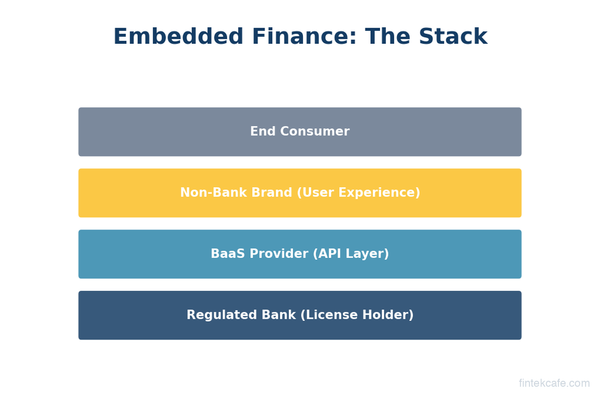
What Is Embedded Finance? How Non-Banks Are Becoming Banks
What is embedded finance and why are non-banks offering financial services? A complete guide to embedded payments, lending, insurance, and banking as a service.