
Payment Gateway vs Payment Processor: What's the Difference?
Payment Gateway vs Payment Processor: What's the Difference?
Ask most people what happens when they tap their card to pay for coffee, and they'll say "the payment goes through." Ask a developer integrating a checkout page, and they'll usually say "it goes through Stripe." Ask an accountant at a retail chain, and they'll mention something about their "merchant services provider."
Everyone is partially right, but confusing two distinct roles: the payment gateway and the payment processor. These terms get used interchangeably all the time — even by people who work in payments. This article explains what each one does, why the distinction matters, and when it's relevant to you.
The Core Analogy
Before diving into technical definitions, here's an analogy that makes it stick:
The payment gateway is the front door of a store. It's the interface between the customer and the financial system — it collects card data, encrypts it, and passes it along securely.
The payment processor is the logistics company that delivers the package. It takes the payment instruction, routes it to the right card network, gets authorization from the customer's bank, and handles the settlement of funds.
A physical store needs both: a checkout terminal (gateway) and a way to get money from the customer's bank to the merchant's bank account (processor). Online, these are software services — sometimes separate, sometimes bundled.
What a Payment Gateway Does
A payment gateway handles the secure transmission of payment data. Specifically:
1. Data collection: On a website or app, the gateway provides the form fields (card number, expiry, CVV) or a hosted payment page. This is what you see when you checkout online.
2. Encryption: Card data is immediately encrypted using TLS/SSL. The gateway ensures raw card numbers never touch the merchant's servers — a PCI DSS compliance requirement. Instead, sensitive data is either tokenized or transmitted directly to the processor.
3. Communication with the processor: The gateway formats the payment request and passes it to the acquiring bank or payment processor.
4. Response relay: The processor sends back an approval or decline, and the gateway communicates that result to both the merchant's checkout and the customer.
In a physical store, the payment terminal (the device you tap or swipe) performs the gateway function — it captures card data and transmits it securely.
The gateway doesn't move money. It's purely a data transmission and security layer.
Standalone gateway examples
- Authorize.Net — One of the oldest US payment gateways. It routes to multiple processors and acquiring banks. Does not handle settlement itself.
- NMI (Network Merchants Inc.) — Another standalone gateway common in US e-commerce.
- 3C Payment — Enterprise-focused gateway popular in hospitality.
Standalone gateways typically charge a monthly fee ($25-50/month) plus a small per-transaction fee ($0.05-0.10). They're then layered on top of a separate processing relationship.
What a Payment Processor Does
The payment processor handles the authorization and settlement of transactions. Once it receives card data from the gateway, it:
1. Routes to the card network: The processor determines which card network (Visa, Mastercard, Amex) is associated with the card and submits an authorization request.
2. Gets authorization: The card network routes the request to the cardholder's issuing bank. The issuing bank checks: Is there available balance/credit? Does the transaction look legitimate? It responds with approved or declined.
3. Returns authorization to the gateway: The processor sends the auth response back through the chain to the merchant.
4. Settlement: At end of day (or batch), the processor submits all authorized transactions to the card networks for settlement. Funds flow from the issuing banks, through the card network and acquiring bank, to the merchant's account. This typically takes 1-2 business days.
5. Handles chargebacks, disputes, and refunds: The processor manages the dispute lifecycle when customers challenge transactions.
The processor has a direct relationship with the card networks (Visa, Mastercard, etc.) and manages the acquiring bank relationship on the merchant's behalf.
When They're Separate vs Combined
Traditional (Separate) Model
Historically, the gateway and processor were distinct vendors. A merchant would contract:
- A merchant account (a special bank account for holding card payment funds) from a bank or ISO
- A processor to handle authorization and settlement (Worldpay, TSYS, Fiserv)
- A gateway to connect their website or POS to the processor (Authorize.Net, PayTrace)
This setup made sense for large merchants who wanted to negotiate separately and optimize each layer. A retailer doing $100M/year has leverage to negotiate custom interchange-plus pricing with a processor and might want a specific gateway for features or integrations.
The complexity: three vendors, three contracts, three sets of fees to track.
Modern Combined Model (Payment Service Providers)
Most modern payment platforms bundle gateway and processing into a single product. These are called Payment Service Providers (PSPs) or sometimes merchant acquirers.
Stripe: One integration, one contract, one monthly reconciliation. Stripe acts as the gateway (handles card data, encryption, and hosted checkout) and the processor (handles authorization, routing, settlement). Pricing: 2.9% + $0.30 per successful charge in the US.
Square: Similar all-in-one model, focused on physical retail and small business. Includes POS hardware, gateway, and processing.
Adyen: Enterprise-focused platform used by large merchants (Spotify, Airbnb, eBay). Single platform covering gateway, processing, and acquiring across 200+ markets.
Braintree (owned by PayPal): PayPal's developer-focused PSP, often used by marketplaces and subscription businesses.
The PSP model wins on simplicity and speed to launch. The tradeoff: PSPs typically charge a blended rate (2.9% + $0.30) that bundles their cut with interchange. Large merchants often find this more expensive than negotiating interchange-plus pricing with a traditional processor.
Key Players in Each Category
Payment Gateways (Standalone)
| Gateway | Market | Strength |
|---|---|---|
| Authorize.Net | US SMB | Oldest, most integrations |
| NMI | US B2B | White-label, ISV-friendly |
| Spreedly | Global | Multi-processor routing |
| Cybersource (Visa) | Enterprise | Fraud tools, global reach |
Payment Processors (Traditional)
| Processor | Market | Clients |
|---|---|---|
| Fiserv (First Data) | US, global | Large retailers, banks |
| Worldpay (FIS) | Global | Enterprise, cross-border |
| TSYS (Global Payments) | US | Hotels, healthcare |
| Elavon | North America | Small-mid business |
PSPs (Gateway + Processor Combined)
| PSP | Strength | Best For |
|---|---|---|
| Stripe | Developer experience, global | Tech startups, SaaS |
| Square | Hardware + software + POS | Retail, restaurants |
| Adyen | Enterprise, global acquiring | Large merchants |
| Braintree | Marketplaces, subscriptions | PayPal ecosystem |
| Checkout.com | Global, emerging markets | Cross-border commerce |
| Mollie | European SMB | EU e-commerce |
PSPs vs Traditional Merchant Accounts
The choice between a PSP (like Stripe) and a traditional merchant account (processor + bank account) comes down to volume and complexity.
PSP advantages:
- Speed: Launch in hours, not weeks
- Simplicity: One integration, one statement, one support line
- No monthly minimums: Pay only on transactions
PSP disadvantages:
- Higher effective rate: 2.9% flat vs 1.5-2.2% interchange-plus at volume
- Less control: PSP can hold or freeze funds if they detect unusual activity
- Shared merchant account risk: PSPs pool merchants — your account can be affected by platform-level decisions
Traditional merchant account advantages:
- Lower rates at volume: An interchange-plus pricing model saves 0.5-1% on large volumes
- Stability: Direct relationship with acquiring bank, lower risk of account freezes
- Customization: Custom risk settings, MCC codes, specialized processing needs
Rule of thumb: Under $50K/month in card volume, Stripe or Square wins on simplicity. Over $100K/month, running interchange-plus pricing numbers starts to make sense.
How to Choose
Ask these questions:
1. How fast do you need to be live?
PSP (Stripe, Square): hours. Traditional merchant account: 2-5 business days to weeks.
2. What is your monthly volume?
Under $50K/month → PSP. Over $100K/month → compare PSP vs interchange-plus.
3. Do you sell internationally?
Adyen and Checkout.com have stronger international acquiring. Stripe is expanding but still US/EU centric for best rates.
4. Do you need a physical POS?
Square wins for integrated hardware + software. Stripe Terminal for developer-built POS. Adyen for enterprise omnichannel.
5. Do you have a subscription or marketplace business?
Stripe Billing (subscriptions) and Stripe Connect (marketplaces) are industry-leading. Braintree is also strong here.
6. Are you in a high-risk category?
Adult content, firearms, CBD, gambling, and travel have difficulty with major PSPs. Specialized high-risk processors (Instabill, PayKings, SMB Global) exist specifically for these verticals.
The Full Payment Authorization Flow (Gateway + Processor Together)
Here's the complete picture when a customer clicks "Pay" on an e-commerce checkout:
Customer enters card data
    ↓
Payment Gateway
  • Encrypts and tokenizes card data
  • Transmits to payment processor
    ↓
Payment Processor
  • Receives payment request
  • Routes to card network (Visa/Mastercard)
    ↓
Card Network
  • Routes authorization request to issuing bank
    ↓
Issuing Bank
  • Checks balance, fraud rules
  • Approves or declines
  • Returns auth response
    ↓
Card Network → Processor → Gateway → Checkout
  • "Approved" displayed to customer
    ↓
End of Day: Settlement Batch
  • Processor submits all approved transactions
  • Card network transfers funds from issuing bank
  • Acquiring bank deposits funds in merchant account
  • Usually next business day
The authorization step (up to "Approved") takes about 1-3 seconds. Settlement takes 1-2 business days.
Payment Pricing Models: Flat Rate vs Interchange-Plus vs Tiered
Understanding pricing requires knowing the three models used in the industry.
Flat Rate (PSP Model)
Stripe, Square, and most PSPs charge a single blended rate: 2.9% + $0.30 in the US. This covers everything: interchange (the fee that goes to the cardholder's issuing bank), network fees (Visa/Mastercard assessment), and the processor's margin.
Pros: Predictable, simple billing. Easy to model costs.
Cons: Expensive at scale. A rewards card that costs 2.2% interchange is charged the same flat 2.9% — Stripe keeps the difference.
Interchange-Plus (Cost-Plus) Pricing
The actual interchange rate — set by Visa/Mastercard — is passed through to the merchant, plus a fixed processor markup. Example: Interchange (1.5%) + 0.25% + $0.10.
Interchange varies by card type: a basic Visa debit card might be 0.80% + $0.15; a premium Visa Infinite rewards card might be 2.40% + $0.10. With interchange-plus, you see the true cost.
Pros: Transparent; cheaper for high-volume merchants accepting basic cards.
Cons: Variable monthly bills; requires volume to negotiate access.
Tiered Pricing
Older processors group card types into 3-4 tiers (qualified, mid-qualified, non-qualified) and charge a rate per tier. Designed to be simple but often opaque — processors can classify transactions into less favorable tiers to increase their margin. Generally considered the worst pricing model for merchants.
Most savvy businesses move from flat-rate to interchange-plus once they reach $50K-100K/month in card volume, saving 0.5-1.0 percentage points.
Tokenization and PCI Compliance: How Gateways Actually Protect Card Data
The payment gateway's primary security function is tokenization — ensuring raw card numbers never touch systems that can be breached.
When a customer enters card details on your checkout page:
- The gateway JavaScript (loaded on your page) captures the card number directly, in the browser
- The card number is sent encrypted directly to the gateway's servers (never to your servers)
- The gateway returns a token — a random, meaningless string like
tok_1A2B3C4D— to your application - Your application stores the token, not the card number
- Future charges use the token; the gateway knows which real card it represents
This is why a Stripe integration that uses Stripe.js never sends actual card numbers to your servers. Your server sees only tokens. Even if your database is breached, the attacker gets useless tokens — not card numbers.
PCI DSS scope reduction: This architecture is why most small-medium merchants can claim "SAQ A" PCI compliance (the simplest self-assessment) rather than full PCI DSS Level 1 audits. By offloading card data to the gateway's hosted fields or hosted payment page, you've removed your systems from PCI scope for card data storage.
Network tokenization (Apple Pay, Google Pay) adds another layer: the card network itself replaces your PAN (card number) with a network token tied to a specific device and merchant, making stolen tokens useless for fraud elsewhere.
Key Takeaways
- Gateway = front door: Collects and securely transmits card data. It's the PCI compliance layer, not the money mover.
- Processor = engine: Routes authorization requests, interfaces with card networks, handles settlement of funds.
- Modern PSPs like Stripe, Square, and Adyen bundle both into one product — simpler but potentially more expensive at scale.
- Traditional merchant accounts are cheaper at high volume — interchange-plus pricing saves 0.5-1.0% vs flat-rate PSP pricing above $50K/month volume.
- Tokenization is how gateways protect card data — raw card numbers never touch merchant systems; tokens are useless if stolen.
- For most new businesses, start with Stripe or Square — launch fast, optimize pricing later when volume justifies it.
- Three pricing models exist: flat-rate (simple, PSP default), interchange-plus (transparent, better at volume), tiered (avoid this one).
Chargebacks: The Cost Both Sides Pay
One area where gateway and processor responsibilities blur is chargebacks. When a customer disputes a charge with their card issuer, the chargeback process runs in reverse through the processor.
The chargeback lifecycle:
- Cardholder disputes a charge with their bank (issuing bank)
- Issuing bank debits the funds and notifies the card network
- Card network notifies the acquiring processor
- Processor notifies the merchant (via gateway portal or email)
- Merchant has 7-30 days to respond with evidence
- If merchant wins: funds restored. If merchant loses: funds returned to cardholder.
Each chargeback — win or lose — typically costs the merchant $15-100 in chargeback fees charged by the processor. Win rates are industry-specific but average around 45%.
Chargeback thresholds: Card networks set maximum chargeback ratios. Merchants exceeding 1% of transactions as chargebacks (Visa's threshold) enter a monitoring program with elevated fees and potential termination. Persistently high chargeback rates can result in losing card processing entirely.
This is a significant operational function that PSPs like Stripe handle through their dashboard, while traditional processor relationships require the merchant to manage disputes through separate portals.
Related Reading
- How Payment Networks Work: Visa, Mastercard, and the Four-Party Model (Pro)
- SWIFT vs SEPA vs UPI: Global Payment Networks Compared
- How Cross-Border Payments Work
- How ACH Payments Work — Coming Soon
Free Weekly Fintech Insights
Understanding payments infrastructure is a career edge in fintech, product, and engineering. FinTekCafe publishes weekly explainers for professionals who need the full picture.
Related Articles
Open Banking Failed Its Promise — Here's What Actually Works
Open Banking promised a revolution. Adoption is low and APIs are fragmented. But the real winners are emerging in unexpected places.
How Central Bank Digital Currencies Will Change Finance
What are CBDCs and how will they change banking? A complete guide to central bank digital currencies, from China's digital yuan to the EU's digital euro.
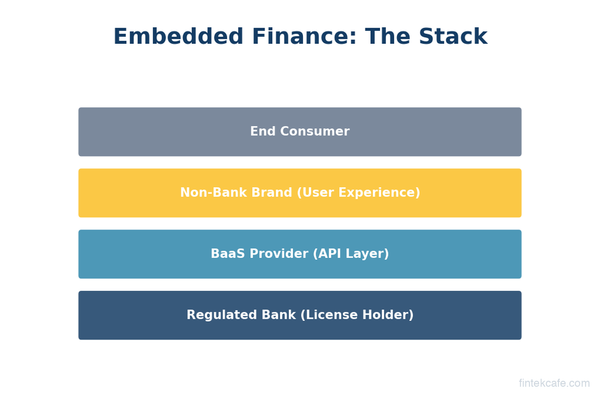
What Is Embedded Finance? How Non-Banks Are Becoming Banks
What is embedded finance and why are non-banks offering financial services? A complete guide to embedded payments, lending, insurance, and banking as a service.