
Cloud Computing Explained: What Every Business Leader Needs to Know
When your CTO says "we're moving to the cloud," they could mean three completely different things. They might mean renting raw computing infrastructure from Amazon. They might mean adopting a platform like Salesforce or Workday. They might mean deploying a database on Google Cloud instead of running it in your own data center.
These are not the same decision. They have different cost structures, different risk profiles, different vendor dependencies, and different implications for your engineering team. "The cloud" has become a marketing term so broad it has almost lost meaning — but the underlying business decisions it obscures are among the most consequential technology choices a company makes.
Here is what cloud computing actually means, and what every executive making or approving cloud decisions needs to understand.
The Three Things "Cloud" Actually Means
The cloud computing industry divides into three distinct models. Understanding which one your team is proposing matters more than the technology underneath.
IaaS — You Rent the Building, You Handle Everything Else
Infrastructure as a Service means renting computing power, storage, and networking from a cloud provider — AWS, Microsoft Azure, or Google Cloud — and running your own software on top of it.
Think of it as renting an empty office building. The landlord provides the physical structure, electricity, and plumbing. You are responsible for everything inside: furniture, security, maintenance, staffing, and building your own processes. The landlord does not care what you do with the space.
IaaS is what most engineers mean when they say "the cloud." You provision virtual servers, storage buckets, and database instances. You have maximum flexibility and control. You also have maximum responsibility — if your application fails, that is your problem.
AWS EC2 (virtual servers), S3 (storage), and RDS (managed databases) are the canonical IaaS products. Microsoft Azure and Google Cloud Platform have direct equivalents.
The business implication: IaaS is cheaper than owning your own data center, but it requires engineering expertise to manage well. The "cloud is expensive" complaints that executive teams hear usually come from IaaS being used without proper cost management — someone left a server running or forgot to turn off a data processing job.
PaaS — You Rent the Kitchen, You Cook Your Own Food
Platform as a Service sits one level up. The cloud provider manages the underlying infrastructure; your developers write and deploy code on top of a managed platform without worrying about servers, operating systems, or database administration.
If IaaS is renting an empty building, PaaS is renting a fully equipped commercial kitchen. The equipment is there, the health codes are met, the gas is running. You just cook.
Heroku, Google App Engine, and AWS Elastic Beanstalk are classic PaaS offerings. More recently, Vercel, Railway, and similar platforms have popularized PaaS for modern web applications.
The business implication: PaaS lets small engineering teams build and deploy software faster. You trade flexibility for convenience. This is usually the right trade-off for startups and product teams that want to ship features rather than manage infrastructure.
SaaS — You Order Takeout
Software as a Service means you use fully built software delivered over the internet. Salesforce, Workday, Slack, Zoom, Microsoft 365 — these are all SaaS products. You have no servers to manage, no code to deploy, no infrastructure concerns. You log in and use the product.
The analogy breaks down a little here: SaaS is not really "cloud" in the infrastructure sense. It is software that happens to run in someone else's cloud. But it lives under the "cloud" umbrella because it replaced traditional on-premise software installations.
The business implication: SaaS is the fastest-growing cloud category and the most consequential for business decisions. The question is not technical — it is commercial. What data are you giving a vendor? What happens if they raise prices 30%? What is your exit strategy when your entire sales team runs on HubSpot? Module 2 of the Technology for Executives course covers SaaS contracts and vendor risk in detail.
The Real Business Case for Cloud: CapEx to OpEx
Before cloud computing, building technology required capital expenditure. You bought servers, paid for a data center, hired staff to maintain it, and depreciated the hardware over three to five years. The investment was front-loaded and largely fixed.
Cloud converts that capital expenditure into operating expenditure. Instead of spending $5 million on a data center, you spend $400,000 per month on AWS — and you can scale that up or down based on what you actually need.
This shift has several significant business effects.
Cash flow. Capital is not tied up in depreciating hardware. The balance sheet is cleaner. For startups and growth companies especially, preserving capital for product development and customer acquisition rather than infrastructure is a meaningful advantage.
Risk reduction. If you build a data center for the traffic you expect in three years and the product fails, you have wasted years of depreciation. Cloud resources can be terminated when no longer needed. You paid for what you used.
Speed. Provisioning a server on AWS takes about 90 seconds. Purchasing, shipping, installing, and configuring a physical server takes four to eight weeks. For companies trying to move fast, this difference is real.
The trade-off. Cloud economics work in your favor when usage is variable or unpredictable — when you need to scale up for Black Friday and scale back down in January. They work against you when your usage is large, stable, and predictable. At sufficient scale, running your own infrastructure becomes cheaper again. Dropbox famously moved workloads off AWS and saved approximately $75 million over two years after reaching a scale where cloud pricing no longer made sense. Apple, Google, and the hyperscalers run their own data centers for the same reason.
Multi-Cloud: Strategy or Complexity?
Most large enterprises use multiple cloud providers. The average enterprise uses 2.6 public clouds according to Flexera's annual survey. The stated rationale is usually "avoiding vendor lock-in" or "using best-of-breed services."
The reality is more complicated.
The genuine case for multi-cloud: Some applications genuinely run better on specific clouds. Google BigQuery is best-in-class for analytics workloads. AWS has the deepest AI/ML tooling. Azure dominates in enterprise Microsoft integrations. If your business genuinely needs capabilities across providers, multi-cloud makes sense.
The vendor negotiation case: Running meaningful workloads on two clouds gives you genuine leverage in contract negotiations. If AWS knows you can shift 30% of your spend to Azure, their enterprise pricing reflects that.
The accidental multi-cloud case: Most enterprise multi-cloud is not strategic — it is the result of different teams making independent decisions. Marketing chose Salesforce (Salesforce infrastructure). Engineering chose AWS. The finance system runs on Microsoft Azure because it integrates with Office 365. The company is multi-cloud because of organizational dynamics, not because of a deliberate architecture decision.
The cost of complexity. Multi-cloud is expensive to manage. You need staff who understand two or three different cloud environments. Security policies must be replicated across platforms. Data transfer between clouds costs money (this is often missed in cloud budgets — cloud providers charge for data leaving their network). Before pursuing a multi-cloud strategy, executives should ask whether the benefits justify the operational overhead.
What "Vendor Lock-In" Actually Means and Whether to Worry About It
The lock-in concern with cloud has two forms. They are not equally serious.
Compute lock-in — being locked in to running servers on a specific cloud — is largely overstated. Virtual servers running standard Linux can move between AWS, Azure, and GCP with manageable effort. Containerization technologies (Docker, Kubernetes) have made applications more portable than ever.
Service lock-in is the real risk. AWS offers hundreds of proprietary services beyond basic compute and storage — managed databases, AI services, serverless functions, message queues, event systems. Each proprietary service you adopt deepens your dependency. Rebuilding an application that relies on 15 AWS-specific services to run on Azure is not a migration — it is a rewrite.
The practical guidance: use proprietary cloud services where the productivity benefit is significant. Be explicit about the lock-in trade-off. Document which parts of your architecture are cloud-portable and which are not. Avoid building critical business logic on top of a proprietary service unless you have made a conscious decision to accept that vendor relationship long-term.
The Security Responsibility You Can't Outsource
Every cloud provider operates on a shared responsibility model. The provider secures the infrastructure — the physical data centers, the network, the hypervisor layer. You are responsible for securing everything you put on top of it: your data, your access controls, your application code, your network configuration.
This is frequently misunderstood. Companies move to AWS and assume AWS is handling their security. They are not. The vast majority of cloud security incidents are not the cloud provider's fault — they are misconfigured storage buckets (data accidentally made public), overly permissive access roles, or leaked credentials.
The Capital One data breach in 2019 compromised 100 million customer records. The data was in AWS S3. AWS was not at fault — the misconfiguration was Capital One's. The cloud provider provided secure infrastructure; the company failed to configure it securely.
Before migrating to cloud, ensure your team understands the security model. "The cloud handles security" is not a risk mitigation strategy — it is a misunderstanding of how cloud security works.
Key Takeaways
- Cloud is not one thing. IaaS, PaaS, and SaaS have fundamentally different implications for cost, control, and vendor dependency. Know which you are adopting.
- The real business case for cloud is CapEx to OpEx conversion and speed — not raw cost savings. At sufficient scale, on-premise can be cheaper.
- Multi-cloud is usually accidental, not strategic. The complexity costs are real. A deliberate single-cloud strategy is often more efficient than unplanned multi-cloud sprawl.
- Proprietary cloud services create real lock-in. Using AWS S3 is fine. Building critical processes on 15 AWS-specific services makes you a permanent AWS customer whether you want to be or not.
- Security responsibility does not transfer to your cloud provider. Misconfigured cloud infrastructure is consistently among the top causes of data breaches.
Related Reading
- Module 3: Cloud Computing — Where Your Data Lives — Deep dive into cloud architecture, provider comparison, and financial services use cases
- Module 2: SaaS — What You're Actually Buying — The hidden costs of SaaS contracts, lock-in mechanisms, and vendor negotiation
- How Fintech Startups Get Licensed — Cloud infrastructure choices intersect directly with data sovereignty and regulatory compliance
Related Articles
The SaaS Pricing Trap: Why Most Companies Get It Wrong
Per-seat pricing is dying, usage-based creates volatility, and most SaaS companies underprice by 30-50%. Pricing is the most underinvested function in tech.
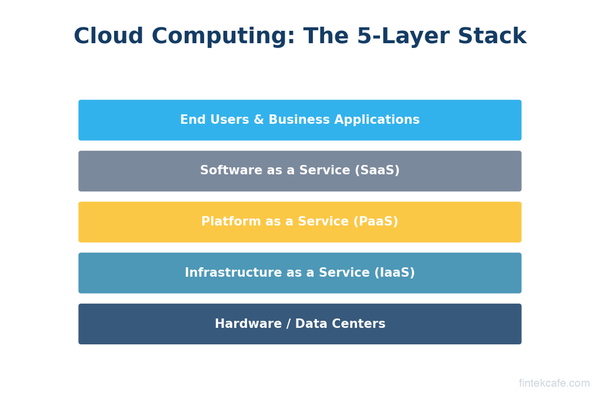
What Is Cloud Computing? A Complete Guide for Business Leaders
What is cloud computing and why does it matter for your business? A plain-English guide to IaaS, PaaS, SaaS, cost models, migration, and security for executives.
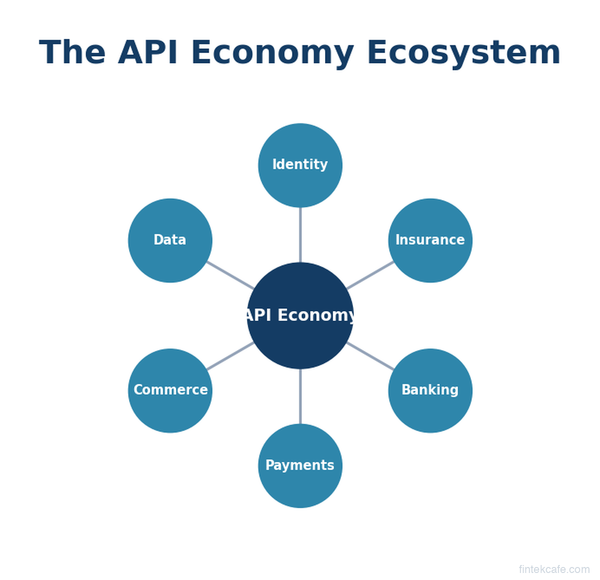
The API Economy Explained: How APIs Create Billion-Dollar Businesses
What is the API economy? Learn how APIs power Stripe, Twilio, and Plaid, why API strategy matters for every business, and how to evaluate API partnerships.